🚚 Free Worldwide Shipping on All Orders!Shop Now

NUGEN Mastercheck UPG: Upgrade to NUGEN Mastercheck – Professional Audio Software & Plugin
Mix & master for the listener
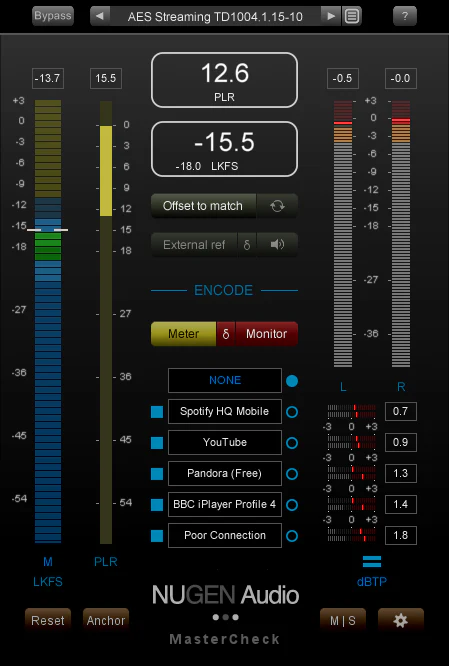
MasterCheck is the complete optimisation solution for today’s delivery services
a plug-in providing the tools to make sure your music reaches the listener as intended. Streaming apps
download stores and podcasts all use data compression
loudness normalisation or both. These processes can affect your track in undesirable ways: your loud
punchy mix could end up quiet and flat
or suffer clipping and distortion.
MasterCheck reveals these problems ahead of time
and enables you to deliver masters perfectly tuned for specific playout systems.
MasterCheck demonstrates the effects of loudness normalisation so you can find the sweet spot between perceived loudness and dynamics
and allows you to hear artefacts introduced by the encoding process ahead of time. You can quickly find the point where these processes will start to negatively impact the music
putting you back in control.
How do people listen to your output? You work hard to deliver masters that sound great at home
in the car or on earbuds
but that’s only half the story. How does your music sound on Spotify
Apple Music
Tidal
SoundCloud or YouTube?
All major online services encode your music
using different specs and formats depending on the playback device
the connection speed
or even whether the user is a “basic” or “premium” customer. Hot mixes can introduce True Peak overs that will clip on playback. MasterCheck detects these errors
and you’ll be able to hear obvious frequency masking and other artefacts. You can monitor the following codecs
with presets for specific streaming services:
List:
- Ogg Vorbis
- FLAC
- Opus
- AAC-LC
- HE-AACv1 (AAC+)
- HE-AACv2 (DAB+)
- MP3
Reference & comparison
Via the 'External ref' function MasterCheck allows you to A/B with reference material in order to check differences in loudness PLR and True Peak measurements. If you wish you can use 'Offset to match' to match the loudness for a direct comparison. 'Offset to match' can also be used to remove loudness from an FX chain. This can be useful for evaluating the impact of signal processing without being influenced by the 'feel good factor' of increased loudness.Flexible workflow
With a resizable interface and many user configurable options MasterCheck can easily be adjusted to suit any situation. Dynamic colour splits for PLR can be set to indicate desirable ranges and meter splits can be easily set to show 'safe zones' which indicate inter-sample peaks and so on.For mastering
Playout services essentially have a ‘letter box’ through which they deliver your audio; if it doesn’t slide through then the service will force it to fit. A super-loud master might win the loudness war on CD but will simply be turned down on any major streaming service. This leaves valuable headroom which you could have used for transient detail and punch. It is important to be aware of how True Peak clipping can cause downstream distortion in encoded audio. Heavy compression will result in audible 'fizzing' and loss of stereo definition especially with lower quality codecs.For mixing
The most popular streaming platforms now only differ by 3 LU between the loudest and quietest target for normalisation. Clearly there is no benefit in mixing louder than the loudest platform at which point all platforms will be turning down your audio. Much of this is primarily a concern for the mastering engineer but if you over-compress a mix then the mastering engineer has nowhere to go. If you compress above a platform's target level transients lost cannot be regained at a later stage. Try using MasterCheck to audition at the service playout level to hear your mix in context.Features:
- Measuring integrated loudness
- Monitoring PLR and PSR to avoid over-compression
- Identifying codec distortion and tweaking to compensate
- A/B referencing at matched loudness
- Preparing mix dynamics for mastering
- Mastering for digital music services
- Measuring dynamic content
- Avoiding downstream clipping
- Auditioning loudness matched FX chains
- Mastering for podcasts and digital radio
Requirements:
| Platform | CPU | RAM | Disk | Notes | Additional Requirement | Audio Card | Ports | Internet Required | 32 Bit Support | 64 Bit Support | Plugins |
| mac | 1 | 0 | 0 | 0 | 0 | VST-3 AU AAX | |||||
| windows | 1 | 0 | 0 | 0 | 0 | VST-3 AAX |
$7,548.00
NUGEN Mastercheck UPG: Upgrade to NUGEN Mastercheck – Professional Audio Software & Plugin—
$7,548.00
Product Information
Product Information
Shipping & Returns
Shipping & Returns
Description
Mix & master for the listener
MasterCheck is the complete optimisation solution for today’s delivery services
a plug-in providing the tools to make sure your music reaches the listener as intended. Streaming apps
download stores and podcasts all use data compression
loudness normalisation or both. These processes can affect your track in undesirable ways: your loud
punchy mix could end up quiet and flat
or suffer clipping and distortion.
MasterCheck reveals these problems ahead of time
and enables you to deliver masters perfectly tuned for specific playout systems.
MasterCheck demonstrates the effects of loudness normalisation so you can find the sweet spot between perceived loudness and dynamics
and allows you to hear artefacts introduced by the encoding process ahead of time. You can quickly find the point where these processes will start to negatively impact the music
putting you back in control.
How do people listen to your output? You work hard to deliver masters that sound great at home
in the car or on earbuds
but that’s only half the story. How does your music sound on Spotify
Apple Music
Tidal
SoundCloud or YouTube?
All major online services encode your music
using different specs and formats depending on the playback device
the connection speed
or even whether the user is a “basic” or “premium” customer. Hot mixes can introduce True Peak overs that will clip on playback. MasterCheck detects these errors
and you’ll be able to hear obvious frequency masking and other artefacts. You can monitor the following codecs
with presets for specific streaming services:
List:
- Ogg Vorbis
- FLAC
- Opus
- AAC-LC
- HE-AACv1 (AAC+)
- HE-AACv2 (DAB+)
- MP3
Reference & comparison
Via the 'External ref' function MasterCheck allows you to A/B with reference material in order to check differences in loudness PLR and True Peak measurements. If you wish you can use 'Offset to match' to match the loudness for a direct comparison. 'Offset to match' can also be used to remove loudness from an FX chain. This can be useful for evaluating the impact of signal processing without being influenced by the 'feel good factor' of increased loudness.Flexible workflow
With a resizable interface and many user configurable options MasterCheck can easily be adjusted to suit any situation. Dynamic colour splits for PLR can be set to indicate desirable ranges and meter splits can be easily set to show 'safe zones' which indicate inter-sample peaks and so on.For mastering
Playout services essentially have a ‘letter box’ through which they deliver your audio; if it doesn’t slide through then the service will force it to fit. A super-loud master might win the loudness war on CD but will simply be turned down on any major streaming service. This leaves valuable headroom which you could have used for transient detail and punch. It is important to be aware of how True Peak clipping can cause downstream distortion in encoded audio. Heavy compression will result in audible 'fizzing' and loss of stereo definition especially with lower quality codecs.For mixing
The most popular streaming platforms now only differ by 3 LU between the loudest and quietest target for normalisation. Clearly there is no benefit in mixing louder than the loudest platform at which point all platforms will be turning down your audio. Much of this is primarily a concern for the mastering engineer but if you over-compress a mix then the mastering engineer has nowhere to go. If you compress above a platform's target level transients lost cannot be regained at a later stage. Try using MasterCheck to audition at the service playout level to hear your mix in context.Features:
- Measuring integrated loudness
- Monitoring PLR and PSR to avoid over-compression
- Identifying codec distortion and tweaking to compensate
- A/B referencing at matched loudness
- Preparing mix dynamics for mastering
- Mastering for digital music services
- Measuring dynamic content
- Avoiding downstream clipping
- Auditioning loudness matched FX chains
- Mastering for podcasts and digital radio
Requirements:
| Platform | CPU | RAM | Disk | Notes | Additional Requirement | Audio Card | Ports | Internet Required | 32 Bit Support | 64 Bit Support | Plugins |
| mac | 1 | 0 | 0 | 0 | 0 | VST-3 AU AAX | |||||
| windows | 1 | 0 | 0 | 0 | 0 | VST-3 AAX |